How to preview your draft job adverts throughout your hiring process.
The Application Tracking System (ATS) makes previewing your draft job adverts quick and easy.
I want to preview my job advert before publishing it to Tes Jobs
When you create a job advert in the ATS, navigate to your Connect dashboard and select Create a Vacancy.
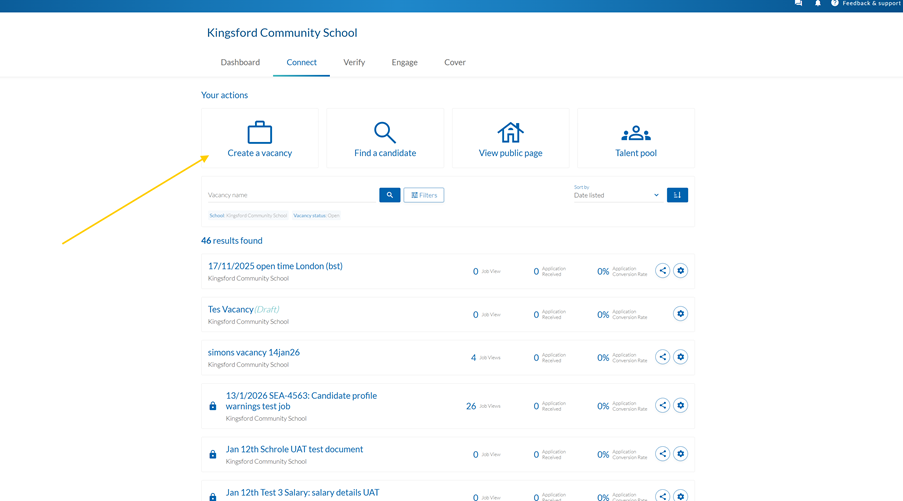
Fill in your vacancy’s details including the job description and position breakdown. You do not need to complete every section of your vacancy to preview in Tes Jobs. However, you will get a more accurate preview when you provide more information.
At the bottom of the preview, select Preview vacancy.
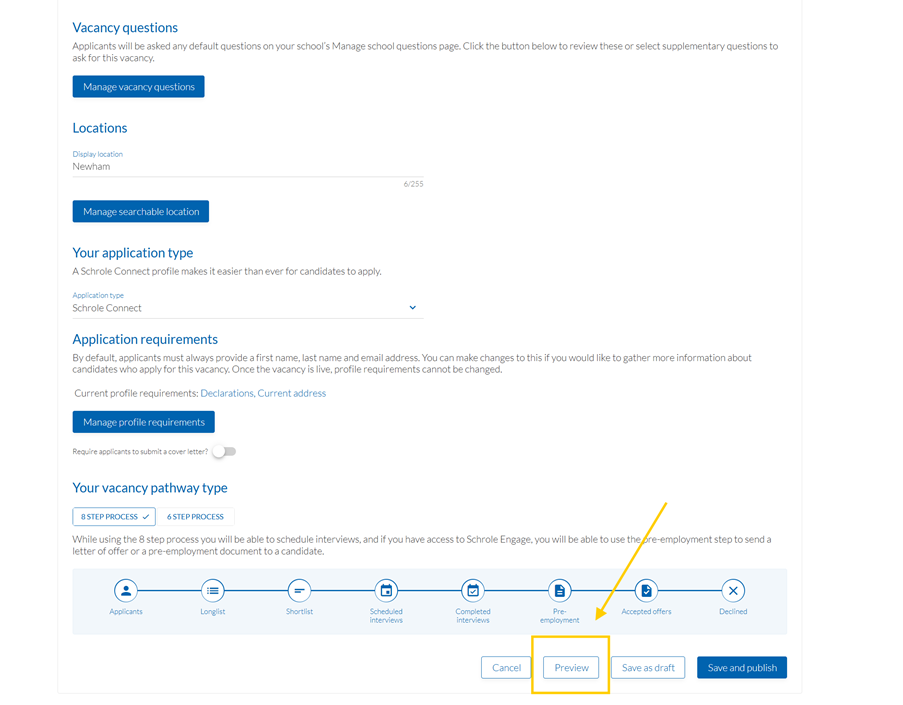
This will open a new tab showing what your advert will look like on Tes Jobs. Tes recommends you preview your advert and change any issues with the advert’s appearance.
Please note: there could be short wait before the preview page appears.
Help and support
Can’t find the answer you’re looking for? We’re here to support you every step of the way.
Help Centre | Contact us |
Our knowledge base has everything you need to know about using Staff Management, including videos, help guides and more.
| Contact us anytime from Mon to Fri, 8:00am-17:00 (UK time).
Call: +44 020 3194 3050 |
Was this article helpful?
That’s Great!
Thank you for your feedback
Sorry! We couldn't be helpful
Thank you for your feedback
Feedback sent
We appreciate your effort and will try to fix the article