In this guide, you will find out how to direct message applicants.
You can now direct message applicants from within the ATS. There are two ways you can do this.
Option 1:
1. Press Connect.
2. Select a posted vacancy.
3. Choose the applicant you want to talk to and press Start a conversation.
4. Enter your message in the text bar and press the paper aeroplane button to send.
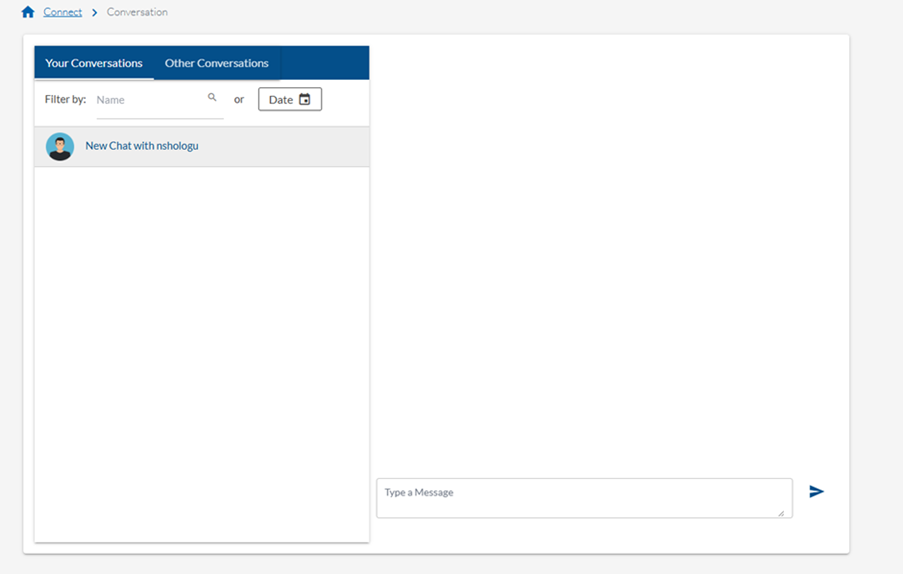
5. Review the messages you have sent to applicants from the conversation panel.
Option 2:
1. Press the speech boxes in the top menu. This will opens up the conversations panel.
2. Select the conversation you want to continue. You can filter by name.
3. Enter your message in the text bar and press the paper aeroplane button to send.
Help and support
Can’t find the answer you’re looking for? We’re here to support you every step of the way.
Help Centre | Contact us |
Our knowledge base has everything you need to know about using Staff Management, including videos, help guides and more.
| Contact us anytime from Mon to Fri, 8:00am-17:00 (UK time).
Call: +44 020 3194 3050 |
Was this article helpful?
That’s Great!
Thank you for your feedback
Sorry! We couldn't be helpful
Thank you for your feedback
Feedback sent
We appreciate your effort and will try to fix the article