If your school is based in the UK and reports on recruitment diversity data to show compliance with relevant laws, we’ve got the solution.
Your equal opportunity reporting dashboard tracks demographics of all applicants and candidates hired. This gives you a breakdown of what type of candidates you’re attracting so you can understand where underrepresentation lies. This shows a snapshot of age, culture/ethnic background, disability status, gender identity, religious belief, or sexual orientation.
How it works
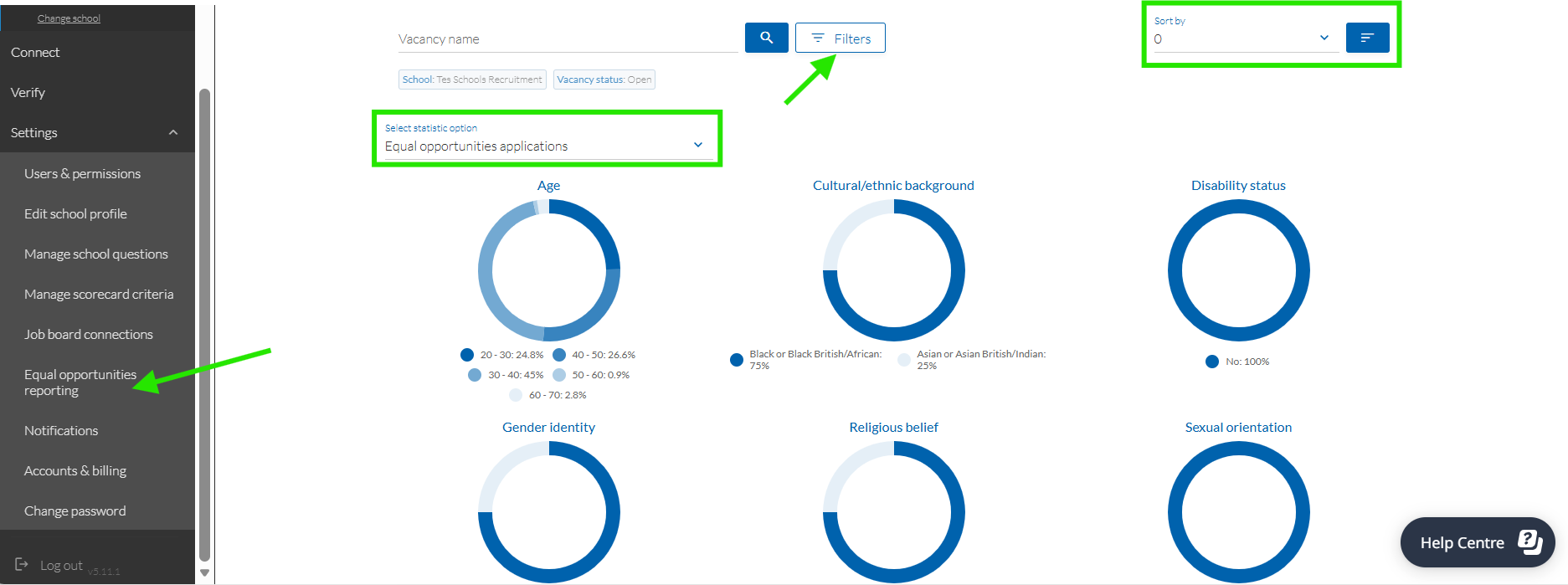
1. After logging in to your Applicant Tracking System, expand the main menu by selecting the hamburger icon  and go to Equal opportunities reporting (under Settings).
2. You’ll see a summary of recruitment data for all open applications, followed by specific data for individual vacancies. You can either search for specific data using the Vacancy name, or Filters if you’d like to see all data for a specific school or vacancy status (useful if you’re a multi-academy trust).
3. Switch between viewing data on Applications or Hires by selecting the relevant option from the Select statistic option dropdown.
4. Sort by date listed or applied if you’re wanting to drill down further.
Now you’ve got boundless data on your candidate diversity to improve future recruitment.
Was this article helpful?
That’s Great!
Thank you for your feedback
Sorry! We couldn't be helpful
Thank you for your feedback
Feedback sent
We appreciate your effort and will try to fix the article