This guide will show you how you can monitor staff wellbeing, and survey performance, across your school's teams using the Insights section of Staff Pulse.
The Insights tab can help you assess what changes have occurred over time and compare those changes in scores with other segments that you have made. This can help you improve in the categories that specific segments are scoring lower in. Whilst you are in Staff Pulse, on the left-hand side, head to the Insights tab and look through the results that are showing.
You will see averages for each category and each segment (made within the settings).
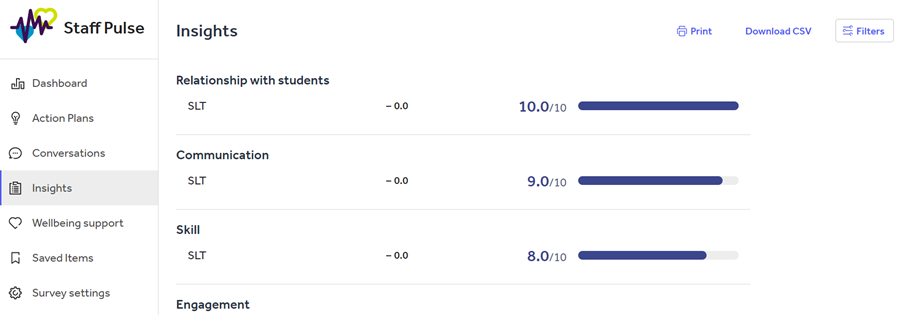
This means you can track the differences between each segment and category so you can see where needs improvement. You can also track whether a specific segment's average score has increased or decreased since the last survey, and how much by.
You can use the Filter button at the top of the page to filter down to specific categories and segments too.
If you would like to export this data, you can use the Download CSV button, or the Print button to take this away. These are located at the top of the page.
Please note: the Insights feature is only available on Staff Management Enhanced and Premium subscriptions.
Help and support
Can’t find the answer you’re looking for? We’re here to support you every step of the way.
Help Centre | Contact us |
Our knowledge base has everything you need to know about using Staff Management, including videos, help guides and more.
| Contact us anytime from Mon to Fri, 8:00am-17:00 (UK time).
Call: +44 020 3194 3050 |
Was this article helpful?
That’s Great!
Thank you for your feedback
Sorry! We couldn't be helpful
Thank you for your feedback
Feedback sent
We appreciate your effort and will try to fix the article