This guide will help you log in to access your professional development platform, from setting up your staff to assigning them safeguarding and professional development courses.
To complete and assign safeguarding and professional development courses, you will be using the Develop platform. You will have received an email from noreply@tes.com inviting you to log into Develop. This will either be from the onboarding phase of your subscription or another staff member at your school could have invited you.
To log into your safeguarding and professional development platform, click here and fill in the username and password that have been shared with you in your welcome email.
Once you have logged in here, you will see the home page.
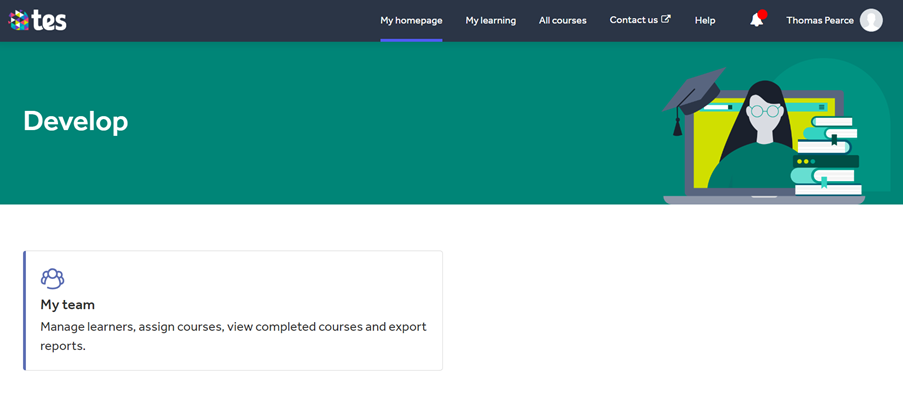
Here you will see a menu bar across the top where you can find any learning that has been assigned to you in My learning, the All courses tab to see every course included in your subscription, a Contact us tab and a Help section.
Underneath this, you will see the My team button. This button will take you to the admin and settings area where you can set up your staff, assign courses and report on completions.
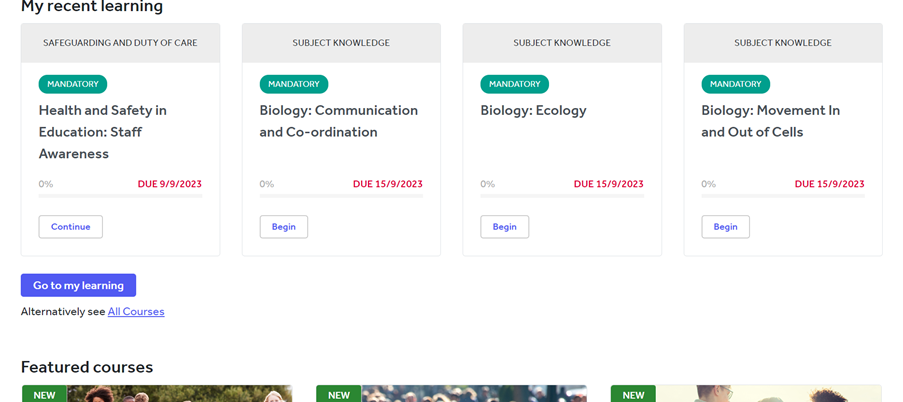
If any courses have been assigned to you, this can be easily accessed by yourself on the home page under My recent learning. This will also highlight the deadlines you have for each course.
Help and support
Can’t find the answer you’re looking for? We’re here to support you every step of the way.
Help Centre | Contact us |
Our knowledge base has everything you need to know about using Staff Management, including videos, help guides and more.
| Contact us anytime from Mon to Fri, 8:00am-17:00 (UK time).
Call: +44 020 3194 3050 |
Was this article helpful?
That’s Great!
Thank you for your feedback
Sorry! We couldn't be helpful
Thank you for your feedback
Feedback sent
We appreciate your effort and will try to fix the article